Auditing & Compliance
HIPAA Compliance
SofTrack Brochure
White Paper:
SofTrack vs. SMS 2003
Chart:
Vendors and their
licensing policies
White Paper:
Controlling Desktop
Software Expenditures
ROI Calculator
|
 |
Free Evaluation + Live Demo |
Solutions, Whitepapers and Case Studies |
Company
SofTrack Simplifies License Compliance
SofTrack simplifies your ongoing needs of software license compliance.
The following sections further detail how SofTrack helps you simplify software license compliance:
Background
The manual method
SofTrack's Quick Inventory
SofTrack's Inventory Change Tracking
SofTrack's Smart Inventory
Saving money with SofTrack
Background
Most if not all software used daily in your organization must be properly licensed. In fact, before the software could even be installed, it is likely you were forced to accept an End User License Agreement or EULA. Acceptance of the software's EULA is a legally binding agreement between your organization and the software provider.
For most software, the number of licenses required, that is, what you must purchase, is equal to the number of licenses where the software is installed, regardless of whether or not it is actually ever used!
If your organization has not purchased a license for each workstation where the software is installed, your organization could be fined tens of thousands of dollars or more for copyright infringement.
Many of the news stories we have posted detail the fines and penalties recently paid by organizations worldwide for copyright infringement. Given the severity of the fines and penalties these organizations were forced to pay, you must properly account for all of your software licenses, failure to do so exposes your organization to the same fines and penalties!
Top of Page
The manual method
Before beginning, please be aware that maintaining a proper accounting of what software licenses have been purchased and installed is very important to ensuring your organization will not be fined for copyright infringement.
Many organizations maintain a spreadsheet to account for software installed and licenses that have been purchased. The method of manually accounting for where software has been installed can lead to a false sense of security.
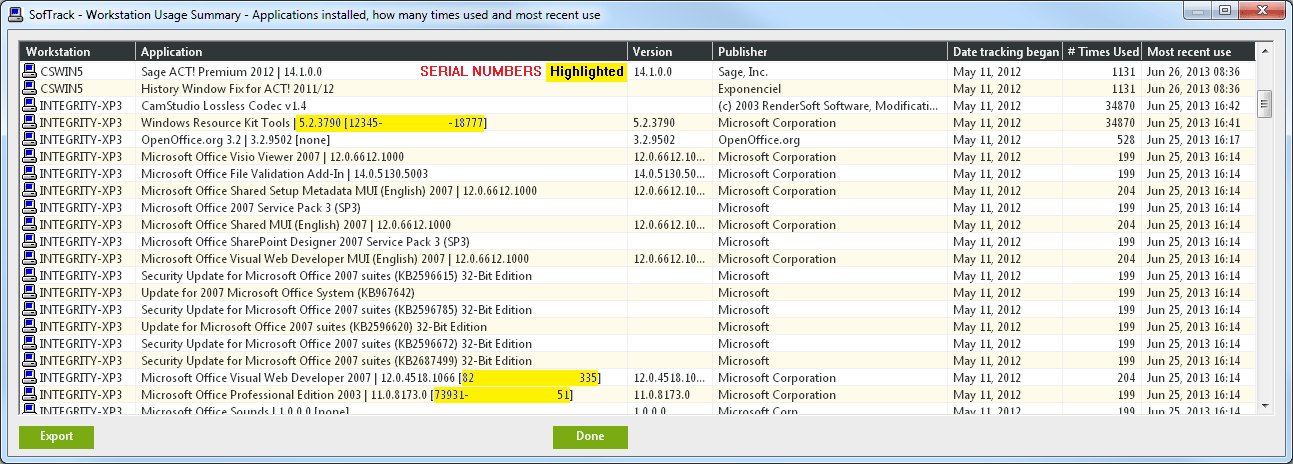
Did you know that many organizations have between 5 and 150 software installations per workstation? The process of manually accounting for all software installed on each workstation can require more than one hour per workstation. Afterall, when you login to a workstation, how do you know what commercial software has been installed? Where do you look? Are you sure you have accounted for all software that is installed? Did you remember to record the serial number for each software installed on each workstation? Note: We define commercial software as that software which you must purchase.
How often do you inventory the workstations? Every 60 days? 90 days? Once a year? Did you know, with a federal search warrant in hand, your organization could be required to immediately prove its compliance with all of its software licenses within a matter of hours? Without an automated solution, the manual process can be almost useless in protecting your organization from the expense of copyright infringement.
We suggest that you use an automated solution to inventory your workstations and the software installed. As for the spreadsheet, we recommend that the spreadsheet be relegated to maintaining the paper trail of purchases that provide details of when each software license was purchased, what vendor it was purchased via, and other details that may be required by each softwares' EULA.
Top of Page
SofTrack's Quick Inventory
When you use SofTrack's Quick Inventory you will always know what software is installed on each workstation throughout your organization. SofTrack's Quick Inventory can even be used to collect software installation information from laptops and notebook computers that are not connected to your internal network.
SofTrack's Quick Inventory takes less than 10 seconds per workstation to completely inventory all commercial software installed. You will find SofTrack's Quick Inventory to be accurate and reliable. It gathers the data you need and does it quickly. In fact, you may find that this is all you need.
When you know where software is installed you can help save your organization from a copyright infringement lawsuit and from suffering a significant monetary loss due to fines and penalties of illegal software installations.
Click here to request your SofTrack Quick Inventory Only Quotation
Click here for more on Quick Inventory
Top of Page
SofTrack's Inventory Change Tracking
When you use SofTrack's Quick Inventory, you also receive an automated and real-time software inventory change tracking report. This report details what software and hardware changes are occurring at each of your workstations.
When you automate the collection of workstation inventory data and what changes have occurred, you can be assured you have properly accounted for all software and where it is installed.
When you know where software is installed you can help save your organization from a copyright infringement lawsuit and from suffering a significant monetary loss due to fines and penalties of illegal software installations.
Click here to request your SofTrack Quick Inventory Only Quotation
Top of Page
SofTrack's Smart Inventory
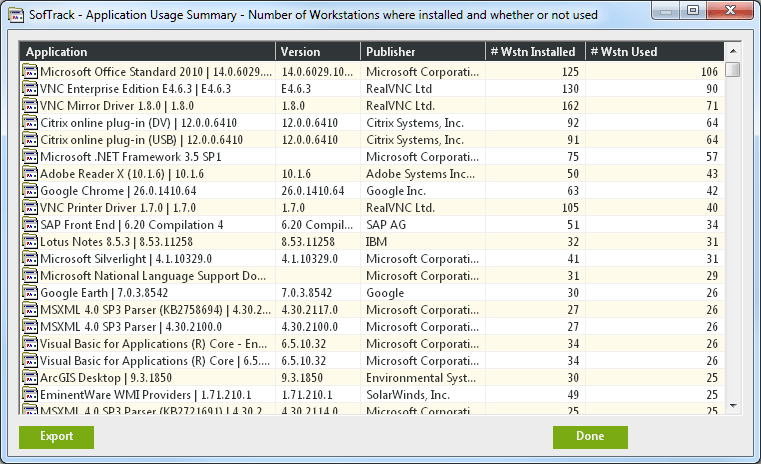
You now know the importance of maintaining a correct and complete record of what software is installed on each workstation throughout your organization. But, did you ever think about how that software is actually used? Each year your organization may be paying thousands or even millions of dollars to continue maintenance and support for each license installed. Is this money being well spent?
You will know if the money is being well-spent with SofTrack's exclusive and patent-pending Smart Inventory.
SofTrack's Smart Inventory detects the usage of every software on every workstation throughout your organization. SofTrack's Smart Inventory automatically combines this awareness with the Quick Inventory records from each workstation. Together, you will find your SofTrack Smart Inventory reports to reveal not only where software is installed but how it is being used.
With the SofTrack Smart Inventory reports you receive, you may find that installed software is not being used. Upon this discovery you can eliminate the software from any such workstation and recoup the benefits of paying less for your annual maintenance and support agreements!
Click here to request your SofTrack Full Product Quotation
We have prepared the following documents with more detailed information regarding SofTrack's Quick and Smart Inventory features:
Controlling Desktop Software Expenditures
Smart Inventory
Quick Inventory
Apple® Macintosh
Top of Page
Saving money with SofTrack
When you use SofTrack's Quick and Smart Inventory functions you can save your organization thousands or even millions of dollars by:
Reducing exposure to fines and penalties due to copyright infringement lawsuits incurred by over installation of software;
Eliminating unnecessary software maintenance and support expenditures;
Saving money on new software purchases by reassigning software from where it is installed but not used to where it is needed;
We have prepared a ROI Calculator to help you determine your organization's savings potential:
ROI Calculator
Click here to request your SofTrack Full Product Quotation
Top of Page
|
|