SofTrack's Smart Inventory provides automatic application recognition including where installed and frequency of use.
SofTrack enables you to maximize your application budget and save money when you renew only the application licenses you are actually using.
Background
Many software applications are licensed per installation (node-locked, single-user) rather than by actual usage. Simply put, when you install an application on a workstation it is counted as being in-use regardless of whether you actually use the application.
Smart Inventory Solution
SofTrack's Smart Inventory provides automatic reports of:
- >What applications are installed
- >Where applications are installed
- >When applications are being used
SofTrack's Smart Inventory enables you to automatically determine the what, where and when of applications in your environment.
SofTrack's Smart Inventory automatically determines what applications are installed on your workstations. There is no requirement of any prior knowledge of what applications are installed at each of your machines!
SofTrack's Smart Inventory will reveal computer-by-computer where applications are installed including version, publisher and where available the application serial number and installation key.
SofTrack's Smart Inventory will detect when each application is used and does not rely upon Windows®
Add/Remove Programs "last used" data. SofTrack's local agent technology will collect the following data per application per workstation:
- >Computer where used
- >Number of times launched (run)
- >Most recent time launched
Smart Inventory Benefits
1. Quickly discover where applications are installed but are NEVER used. Unused applications represent an opportunity to save money$.
- >Save money by removing unused application installations. When unused applications are removed you can eliminate spending associated with the maintenance and upkeep of those unused licenses.
- >Instead of purchasing additional licenses of applications you already own, simply move those installations by removing them where unused to where they are needed. You save money by simply reorganizing your existing installations!
- >Avoid costly penalties and fines for copyright violations that occur when applications are installed on more computers than licensed.
2. Know where applications are installed and where applications are used.
Applications that are unused can be removed and/or uninstalled. When you remove unused applications you can reduce the fees paid for upgrade charges and annual maintenance associated with the uninstalled application licenses.
3. Know where applications are installed and how often they are used.
Follow up questions might include:
- >(a) Are applications installed being underutilized?
- >(b) Do your users require further training in order to use the applications more efficiently or at all?
- >(c) Perhaps underutilization is due to users relying upon older, unapproved software?
- >(d) Are there any applications that have not been used in the past 3 months on any computer?
4. Drill down to the workstation level and discover what applications are being used at each workstation. And, discover how often the applications are being utilized.
Sample Smart Inventory Reports
The following are sample Smart Inventory reports.
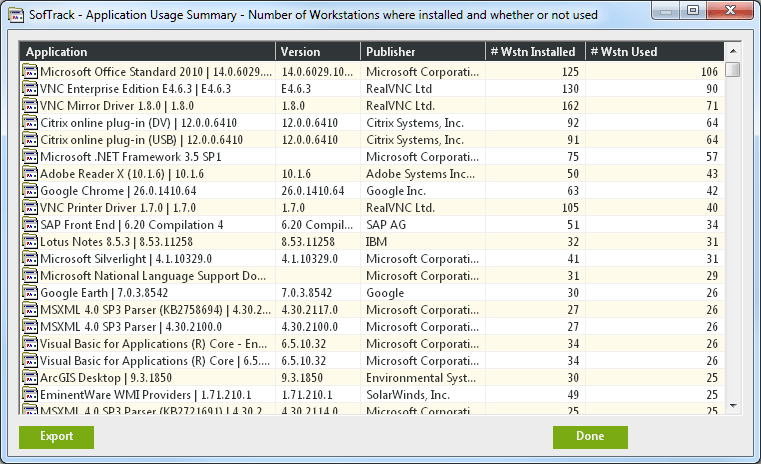
Smart Inventory: Applications Usage Summary
Number of workstations where installed and whether or not used
- >Application Name
- >Application Version
- >Application Publisher
- >Number of Workstations where the application is installed
- >Number of Workstations where the application has been used
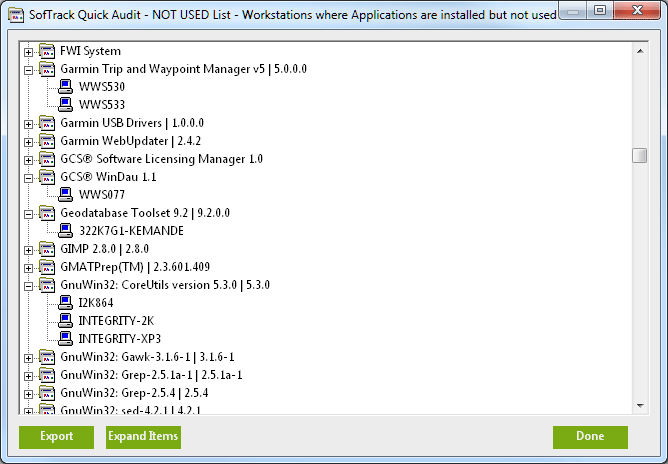
Smart Inventory: Applications NOT USED Report
Workstations where Applications are installed but not used
- >Application Name
- >Application Version
- >Application Publisher
- >Number of Workstations where the application is installed
- >Number of Workstations where the application has been used
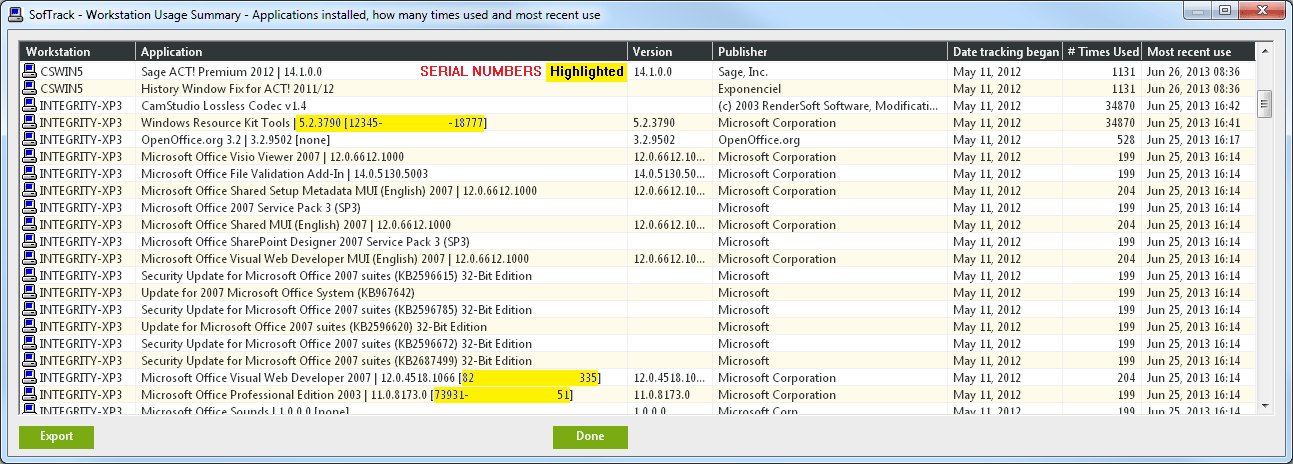
Smart Inventory: Workstation Usage Summary
Applications installed, how many times used and most recent use
- >Workstation Name
- >Application Name
- >Application Serial Number (Windows only)
- >Application Version
- >Application Publisher
- >Date Tracking began
- >Number of times used
- >Date of most recent use